| 5.5. MATLAB | ||
|---|---|---|
 | Chapter 5. Configuring programs for use with the BCVTB |  |
| 5.5. MATLAB | ||
|---|---|---|
| | Chapter 5. Configuring programs for use with the BCVTB | |
To configure MATLAB, you may modify an example such as
the one in the directory
BCVTB/examples/matlab-room, or you may
create new input files. This section describes the latter
approach, which consists of creating a MATLAB script and
a Ptolemy II model.
A MATLAB script that exchanges data with the BCVTB has the following structure:
%%%%%%%%%%%%%%%%%%%%%%%%%%%%%%%%%%%%%%%%%%%%%%%%%%%%%%%%%%%%%%%%%%%%%
% Initialize variables
% ... (not shown)
%%%%%%%%%%%%%%%%%%%%%%%%%%%%%%%%%%%%%%%%%%%%%%%%%%%%%%%%%%%%%%%%%%%%%
% Add path to BCVTB matlab libraries
addpath( strcat(getenv('BCVTB_HOME'), '/lib/matlab'));
%%%%%%%%%%%%%%%%%%%%%%%%%%%%%%%%%%%%%%%%%%%%%%%%%%%%%%%%%%%%%%%%%%%%%
% Establish the socket connection
sockfd = establishClientSocket('socket.cfg');
%%%%%%%%%%%%%%%%%%%%%%%%%%%%%%%%%%%%%%%%%%%%%%%%%%%%%%%%%%%%%%%%%%%%%
% Exchange data (call this at each time step)
% ... (loop over each time step)
[retVal, flaRea, simTimRea, dblValRea ] = ...
  exchangeDoublesWithSocket(sockfd, flaWri, length(u), simTimWri, ...
                            dblValWri);
%%%%%%%%%%%%%%%%%%%%%%%%%%%%%%%%%%%%%%%%%%%%%%%%%%%%%%%%%%%%%%%%%%%%%
% Close socket at the end of the simulation
closeIPC(sockfd);
%%%%%%%%%%%%%%%%%%%%%%%%%%%%%%%%%%%%%%%%%%%%%%%%%%%%%%%%%%%%%%%%%%%%%
% Exit MATLAB
exit
For a complete MATLAB script that also includes error
handling, see the file simulateAndExit.m in
the directory bcvtb/examples/matlab-room.
To start MATLAB from Ptolemy II, you will need to create
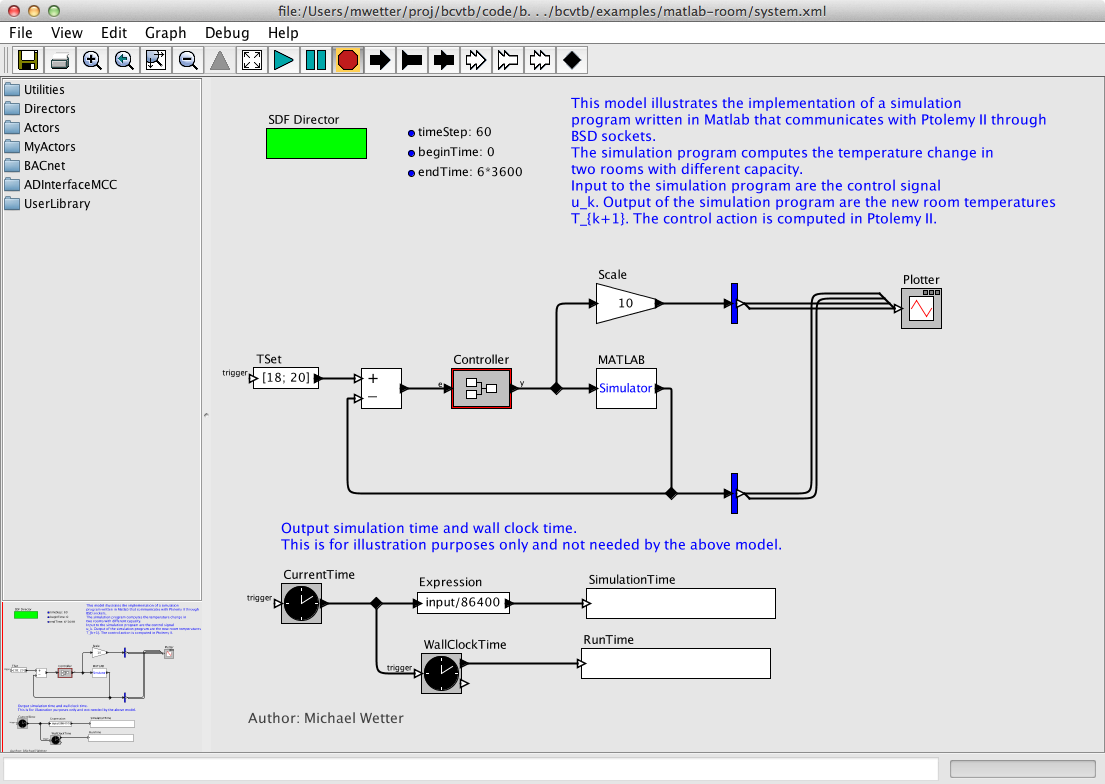
a Ptolemy II model. The model
BCVTB/examples/matlab-room/system.xml shown
in
Figure 5.17
may be used as a starting point. In this example, MATLAB
computes the temperature change in two rooms for a given
control input. The controller is implemented in Ptolemy
II.
Figure 5.17.
Ptolemy II system model that links an actor that computes a control signal with the Simulator actor that communicates with MATLAB.
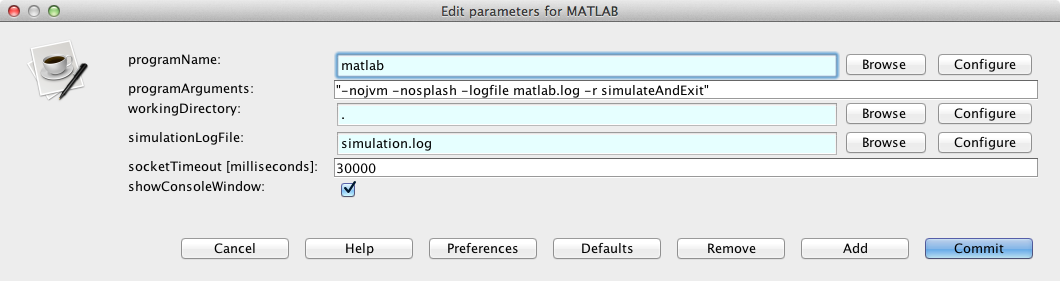
In this model, the Simulator actor that
calls MATLAB is configured as follows:
This completes the configuration.
| |  | |
| 5.4. Dymola |  | 5.6. Simulink |